To place a stock order in COL Pro Mobile, follow these steps:
Tap on the Market tab.
Use the search bar at the bottom of the screen.
Enter the stock code of the company you wish to trade (e.g., DWC).
Select the stock from the list to open its detailed information page.
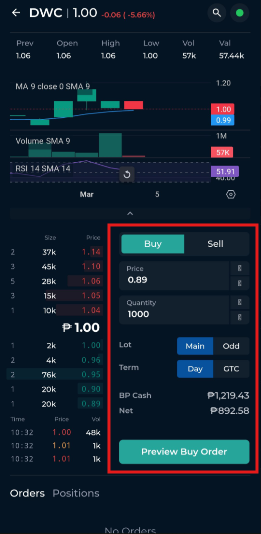
Tap the Buy or Sell button at the lower portion of the screen.
Click Enter Order and fill in your order details:
Order Side: Choose Buy or Sell
Boardlot: Select Main or Odd
Order Type: Choose Day or GTC
Quantity: Enter the number of shares
Price: Enter your desired price
Tap Preview Buy Order (or Sell Order) to proceed.
A confirmation prompt will appear, where you must enter your password to confirm the transaction. You can also tap Show Charges to view the transaction fees.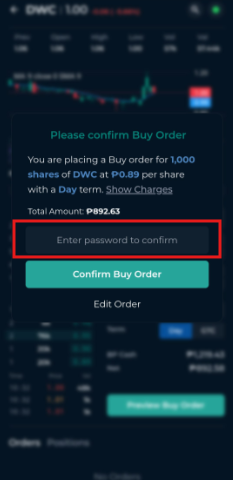
If you need to adjust the price or quantity, select Edit Order. Once submitted, the screen will display a message confirming that your order has been received.